A surprising benchmark comparison reveals that Windows XP often feels faster than Windows 11 when both run on the same aging laptop. The reason isn’t poor optimization — it’s how Windows has fundamentally changed over the last 25 years.
Here’s a thought experiment that sounds almost absurd at first: take six identical laptops, install every major version of Windows released over the last 25 years, and see which one runs fastest.
Logic says the newest OS should win. Cleaner code, smarter schedulers, better optimization. That assumption collapses the moment you look at the actual results. In this test, Windows XP – released in 2001 and now mostly found in ATMs – regularly outperformed Windows 11.
It sounds wrong. It isn’t.
The test setup: Same hardware, six versions of Windows
YouTube creator TrigrZolt ran the experiment using six identical Lenovo ThinkPad X220 laptops, each powered by an Intel Core i5-2520M (Sandy Bridge), 8 GB of RAM, and a 256 GB hard drive. Each system received one Windows version, fully updated:
- Windows XP
- Windows Vista
- Windows 7
- Windows 8.1
- Windows 10
- Windows 11
This hardware was never meant for Windows 11. There’s no TPM 2.0, the CPU is from 2011, storage is a spinning HDD, and UEFI support is… generous at best. The OS had to be installed using workarounds.
That’s exactly why the test is interesting. When resources are limited, inefficiencies stop hiding.
Boot time: Windows 11 loads fast
Boot speed was the first metric tested. Surprisingly, Windows 8.1 came out on top thanks to Fast Boot and a trimmed startup sequence. Vista, long mocked for sluggishness, placed second. Windows XP took third.
Windows 11 finished dead last.
The reason isn’t the kernel. It’s the interface.
Once the core system loads, Windows 11 waits for the taskbar to initialize. Unlike older versions where the taskbar lived inside Explorer.exe, Windows 11’s taskbar is built on WinRT and WinUI 3. That means additional runtimes, services, and UI frameworks must initialize before the desktop is usable.
Fast Boot still exists, but its gains are eaten by slow UI initialization.
Disk space: Modern Windows is heavy by design
Installed disk usage follows a simple rule: newer Windows versions are larger because they rarely remove old components.
- Windows XP — 6.5 GB
- Windows Vista — 15.3 GB
- Windows 7 — 17.4 GB
- Windows 8.1 — ~18 GB
- Windows 10 — ~25 GB
- Windows 11 — 29.8 GB
Backward compatibility comes at a cost. Libraries stick around to prevent legacy apps from breaking, and over time the OS grows bloated. On budget laptops with small, non-upgradable drives, this becomes a real limitation.
RAM usage: Where Windows 11 starts losing the fight
Idle memory usage paints an even clearer picture:
- Windows XP — 0.8 GB
- Windows Vista — ~1.5 GB
- Windows 7 — ~1.8 GB
- Windows 8.1 — ~1.9 GB
- Windows 10 — 2.0 GB
- Windows 11 — 3.3–3.7 GB
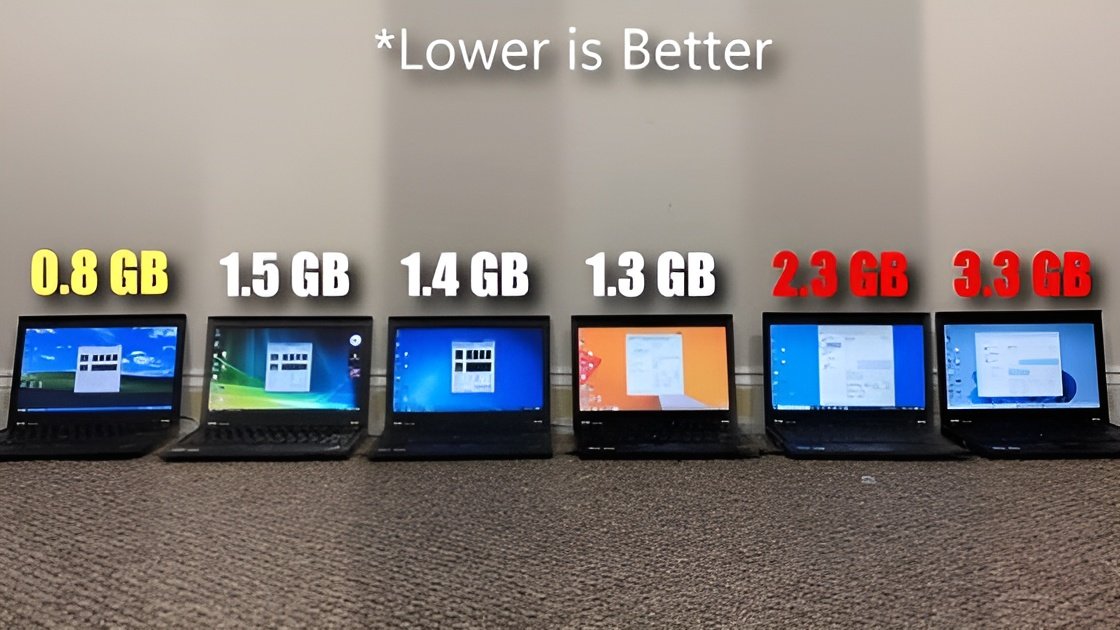
Before opening a single app, Windows 11 is already consuming nearly half of an 8 GB system. The reasons are familiar:
- background accessibility services
- file indexing
- Microsoft Store updates
- WebView2 for system apps
- widgets
- Teams integration
- OneDrive sync
- telemetry and diagnostics
On systems with limited RAM, Windows 11 quickly spills into the paging file. On a mechanical hard drive, that’s where responsiveness goes to die.
Browser stress test: Tabs tell the truth
To measure real-world multitasking, the test pushed each OS until total memory usage hit 5 GB by opening browser tabs.
- Windows 8.1 — 252 tabs
- Windows 7 — over 200 tabs
- Windows Vista — over 100 tabs
- Windows 10 — over 100 tabs
- Windows XP — 50 tabs (paging crashes beyond that)
- Windows 11 — 49 tabs
Despite being ancient, Windows XP still matched Windows 11 — simply because it doesn’t waste gigabytes on background services.
App performance: When lightweight wins
Audacity was used to export the same audio file across all systems. Results ranked best to worst:
- Windows 8.1
- Windows XP
- Windows 7
- Windows 10
- Windows 11
- Windows Vista
Windows 11’s heavier audio stack introduces more latency. Where XP used a short path to the driver, modern Windows routes audio through multiple permission and processing layers. On slow storage, every extra step hurts.
Launching everyday apps like File Explorer, Paint, Calculator, Adobe Reader, and VLC told a similar story. Windows 11 consistently finished last, with Windows 10 taking first place.
Even File Explorer struggled. Its WinUI 3 rewrite, OneDrive hooks, and widget integration roughly doubled memory usage compared to Windows 10’s version.
Benchmarks vs reality
Synthetic benchmarks didn’t save Windows 11 either.
In CPU-Z single-core testing, Windows XP actually took first place, narrowly beating Windows 7. Windows 11 landed fourth. Multi-core results showed the same trend.
Geekbench 6 favored Vista, while Windows 11 edged out Windows 10 in single-core but lost in multi-core workloads. The scheduler is optimized for modern hybrid CPUs, not an old dual-core Sandy Bridge chip – and that mismatch costs performance.
Windows 11 feels slower than XP
This isn’t about bad coding. It’s about architecture.
Older Windows versions relied on GDI and User32, drawing UI through a short, efficient path. Modern Windows uses WinUI 3, WinRT, DirectComposition, and GPU-driven effects. That enables smooth animations, transparency, and blur – but only if the hardware can keep up.
Security adds more overhead. Windows Defender now intercepts nearly every file operation. Telemetry services constantly wake up. On SSDs, this is barely noticeable. On HDDs, it’s brutal.
Why Windows 8.1 won the test
Windows 8.1 accidentally hit the sweet spot.
It introduced Fast Boot, better memory management, and an improved scheduler without dragging along modern UI bloat. It was widely disliked for its interface, but under the hood it remained lean.
Fast Boot works best when the OS itself is lightweight. Windows 8.1 still is. Windows 11 isn’t.
Is 8 GB of RAM enough for Windows 11?
On modern hardware with NVMe storage and 16–32 GB of RAM, Windows 11 behaves very differently. This test used hardware it was never designed for.
Still, the trend is clear: Windows no longer gets lighter with age. Each generation adds features, services, and visual polish. That’s great for new machines. It’s punishing for older ones.
For users on aging laptops or minimal configurations, Windows 11 simply isn’t efficient. Progress has a cost.
The only real question is who ends up paying it.
Source: TrigrZolt (YouTube)
Subscribe!
Subscribe to our newsletter and be in touch with high-tech news
Top Read
A LEGO game wants RTX 3080: Why LEGO Batman’s system requirements shock everyone

MSI launches XpertStation WS300 with Nvidia GB300 Blackwell: up to 496GB RAM and supercomputer hardware in desktop format
Cooler Master’s G360 Dragon Shadow SE Puts an Infinity Mirror on Your CPU Block for $66
EPOMAKER RT100 PRO Ships With a Screen You Can Rip Out for Extra Keys
Intel Core Ultra 7 270K Plus and Core Ultra 5 250K Plus: 24 Cores, 5.5 GHz, $299
