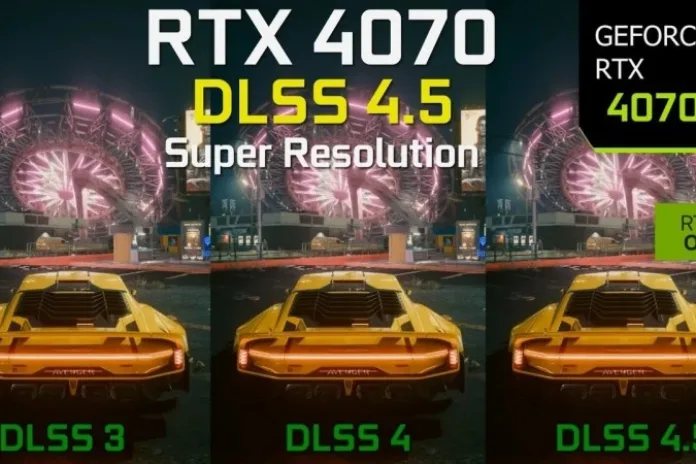
DLSS 4.5 brings noticeable image quality upgrades to Cyberpunk 2077 on the RTX 4070, with sharper details and more stable visuals compared to earlier DLSS versions.
NVIDIA’s new DLSS 4.5 Super Resolution rollout has the PC gaming community buzzing — especially for players pushing Cyberpunk 2077 at high settings. But beyond the headlines, what does this actually mean for RTX 4070 owners? Is the frame rate bump worth chasing? And what trade-offs should you expect when enabling this latest upscaling tech?
Here’s a clear breakdown drawn from recent tests and expert evaluations, with practical insights for gamers who care about both visuals and smooth play.
What is DLSS 4.5 — and why it matters
DLSS has evolved from a simple AI upscaler into a multi-faceted performance and visual enhancement tool. DLSS 4.5 builds on the transformer-based models introduced in earlier versions by:
- Upgrading Super Resolution with a second-generation transformer for sharper, more stable images.
- Introducing new presets like Model M (Performance) and Model L (Ultra Performance).
- Preparing the groundwork for Dynamic Multi Frame Generation and 6× frame generation on newer RTX cards.
For RTX 4070 gamers, the appeal is straightforward: better visuals with minimal compromise — if your setup can handle it.
RTX 4070 performance in Cyberpunk 2077 — What early benchmarks show
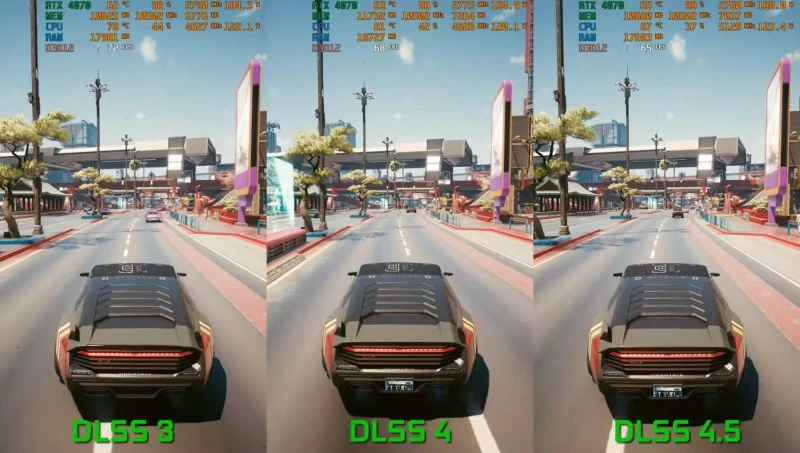
DLSS 4.5’s impact can vary based on resolution, settings, and GPU generation. While specific 4070 Cyberpunk benchmarks are still rolling out, community data and early tests paint a consistent picture:
Visual quality gains
- DLSS 4.5 generally improves image sharpness, reduces shimmering artifacts, and enhances fine detail compared to DLSS 4.
- Preset L (Ultra Performance) often balances upscaling quality and performance at higher resolutions.
Performance Trade-offs
- On older RTX cards (30 series), users have seen notable FPS drops (14–24%) with DLSS 4.5 vs DLSS 4.
- The RTX 4070 should fare better than older GPUs, thanks to FP8 acceleration supporting heavier compute loads, but mild performance cost is still possible — especially at 4K.
Real-world implication
In practical terms: in demanding titles like Cyberpunk 2077, enabling DLSS 4.5 often yields smoother visuals than older DLSS modes, but you may see slightly lower average FPS than with DLSS 4. Whether that’s “worth it” depends on how much you value image quality over raw frame rate.
Settings that make sense for RTX 4070 players
Here’s a starting point if you’re tweaking Cyberpunk 2077 on a 4070:
For 1440p Gaming
- Use DLSS 4.5 Model M for a balanced experience — good visuals with solid performance.
- Avoid putting ray tracing at maximum unless frame rate dips below your target (e.g., 60 FPS).
For 4K gameplay
- Model L (Ultra Performance) is usually the better DLSS 4.5 choice at native 4K to keep frame rates playable.
- Consider lowering less noticed post-process effects (such as shadows and crowd density) to offset GPU load.
These recommendations blend community insights with common best practices, but don’t be afraid to experiment — Cyberpunk reacts differently to upscaling vs raster settings.
Why some players hesitate
Not every RTX owner will rush to DLSS 4.5 immediately. A few realities you should know:
- Higher computational cost: DLSS 4.5 is more demanding than earlier versions, and older GPUs will feel it more.
- Variable gains by game: Improvements depend on how a title implements upscaling and frame generation. Some scenes benefit more than others.
- Driver & support matters: To access the newest DLSS 4.5 features, you’ll need the latest NVIDIA app update and drivers.
Bottom line: Should RTX 4070 owners use DLSS 4.5?
If you play Cyberpunk 2077 on a 4070, DLSS 4.5 is definitely worth testing — especially at 1440p or 4K where visual fidelity gains are most apparent.
You might trade a few frames compared to DLSS 4, but many users will find the visual improvements and smoother upscaled imagery a justifiable exchange. Just bear in mind this isn’t an across-the-board performance miracle: results will differ by map, ray tracing load, and resolution.
Source: youtube
Subscribe!
Subscribe to our newsletter and be in touch with high-tech news
Top Read
A LEGO game wants RTX 3080: Why LEGO Batman’s system requirements shock everyone

MSI launches XpertStation WS300 with Nvidia GB300 Blackwell: up to 496GB RAM and supercomputer hardware in desktop format
Cooler Master’s G360 Dragon Shadow SE Puts an Infinity Mirror on Your CPU Block for $66
EPOMAKER RT100 PRO Ships With a Screen You Can Rip Out for Extra Keys
Intel Core Ultra 7 270K Plus and Core Ultra 5 250K Plus: 24 Cores, 5.5 GHz, $299
