
PowerToys 0.97 brings major updates, including a new mouse tool for multi-monitor users and enhanced Command Palette customization
Microsoft has rolled out a major update to PowerToys 0.97, the first release of 2026. This update brings significant improvements to Command Palette and introduces a brand-new mouse utility designed for users with large or multi-monitor setups.
Command palette gets more customization
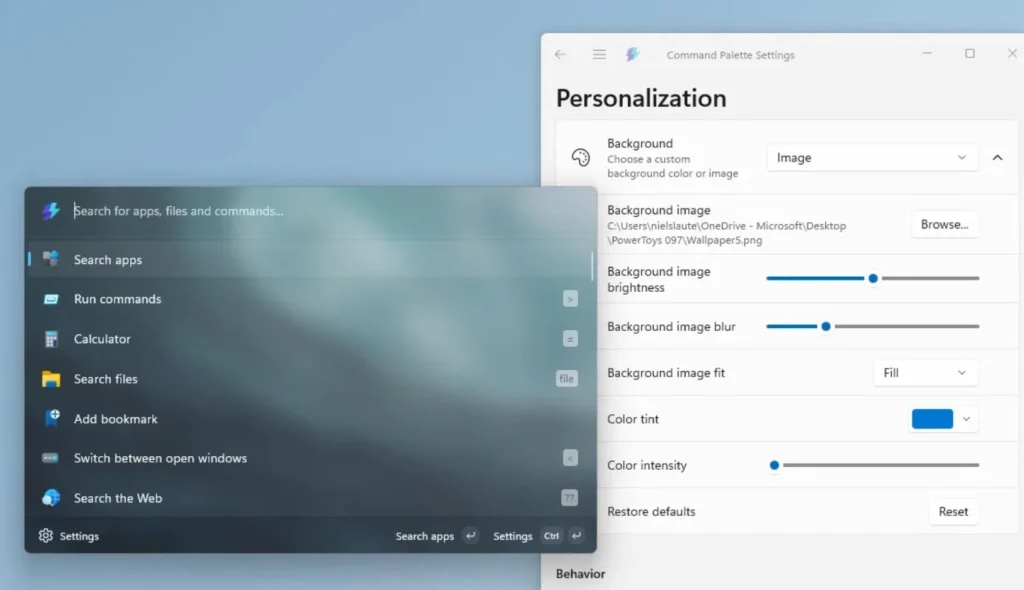
The Command Palette launcher is now highly customizable. Users can select custom backgrounds and color shades for a more personalized look.
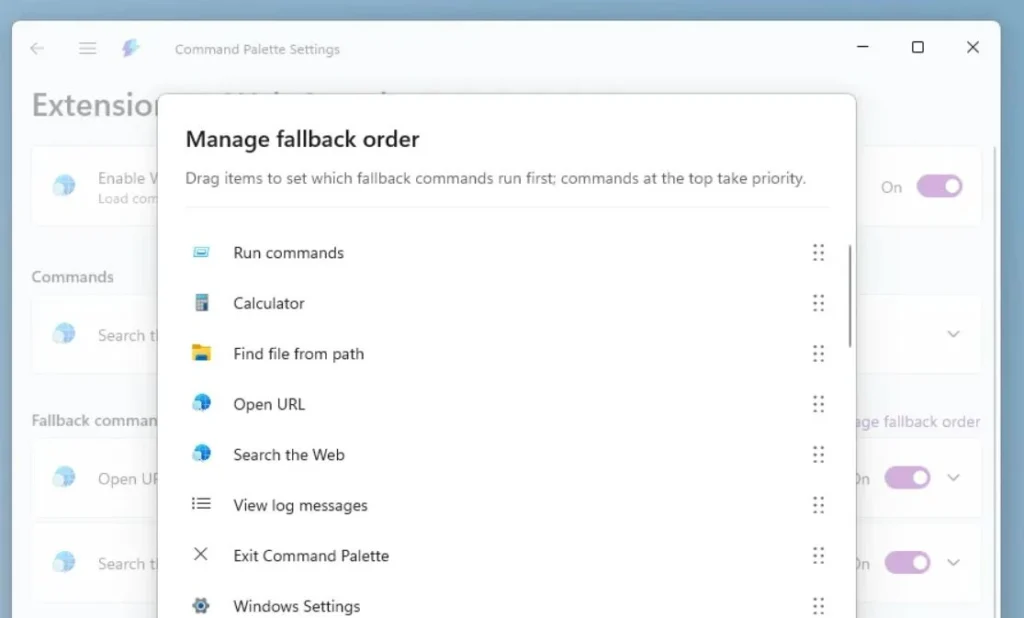
Command priority is now adjustable when typing a query, allowing frequently used commands to appear first.
Additionally, PowerToys can now be managed directly from the palette itself. Users can switch themes, toggle FancyZones layouts, open settings, and more — all without leaving the launcher.
New mouse and desktop tools
A remote desktop extension has been added, making it easier to switch between multiple desktops. Users can also select their preferred search engine for the web search extension.
Drag-and-drop support has been added to the file indexer and clipboard history, enabling content from the command palette to be dropped into other applications. Developers can also integrate this capability into their own extensions.
The new CursorWrap tool is particularly useful for multi-monitor setups. When the cursor reaches one edge of the screen, holding it causes it to appear on the opposite side, reducing the need to drag the cursor across large displays.
Notable feature updates
- Hex color previews in clipboard history
- Automatic placeholder endpoints for empty required fields
- Fixes for AI settings descriptions and hotkey loading
- Updates to extended paste descriptions for online and local model support
- Improvements in clipboard selection to avoid duplicate entries
- Support for AI image input transformations
- Improved tracking of clipboard changes
- Awake CLI bug fixes for proper display of help, errors, and logs
Command palette improvements
- Drag-and-drop support for command palette items
- Integrated PowerToys utilities detection and launch
- Optimization of result list merging for better performance
- Navigation with arrow keys for table views
- Quick access to settings and theme/background customization
- New preview command in indexer extension
- Enhanced Escape key behavior
Utility-specific updates
Crop & Lock: New screenshot mode locks cropped areas in a separate window.
CursorWrap: Optimized for multi-monitor systems; cursor wraps only at outer edges.
File Locksmith: Added CLI for file lock queries and releases.
Find My Mouse: Improved spotlight edges and telemetry tracking.
Image Resizer: CLI support for scripted resizing; fixed fill-mode cropping.
Light Switch: Telemetry events added, Night Light synchronization, quick-access button, and GPO compliance improvements.
Mouse Without Borders: Refactored for better component separation and stability.
Peek: Enhanced previews, stricter resource filtering, SVG rendering via WebView2.
PowerRename: EXIF metadata extraction, improved memory usage, Unicode normalization fixes.
PowerToys Run Plugins: Added QuickAI and Open With Antigravity plugins; bug fixes for DPI scaling and character duplication.
Settings: New adaptive tray icon, centralized module enable/disable logic, UI improvements, semantic headers for accessibility, native AOT serialization, global SettingsUtils singleton.
Subscribe!
Subscribe to our newsletter and be in touch with high-tech news
Top Read
A LEGO game wants RTX 3080: Why LEGO Batman’s system requirements shock everyone

MSI launches XpertStation WS300 with Nvidia GB300 Blackwell: up to 496GB RAM and supercomputer hardware in desktop format
Cooler Master’s G360 Dragon Shadow SE Puts an Infinity Mirror on Your CPU Block for $66
EPOMAKER RT100 PRO Ships With a Screen You Can Rip Out for Extra Keys
Intel Core Ultra 7 270K Plus and Core Ultra 5 250K Plus: 24 Cores, 5.5 GHz, $299
